<?xml version="1.0" encoding="utf-8"?>
<feed xmlns="http://www.w3.org/2005/Atom">
  <id>https://swillus.sylvanruan.top/</id>
  <title type="text">希沃大屏外观图鉴</title>
  <subtitle type="text">阮</subtitle>
  <updated>2026-10-28T00:00:00.000Z</updated>
  <author><name>庄方宜</name></author>
  <link rel="alternate" href="https://swillus.sylvanruan.top/"/>
  <link rel="self" href="https://swillus.sylvanruan.top/atom.xml"/>
  <generator uri="https://github.com/CuteLeaf/Firefly">Firefly v6.16.8</generator>
    <entry>
      <id>https://swillus.sylvanruan.top/posts/fx-c7/</id>
      <title type="text">七代分销交互智能平板</title>
      <published>2026-10-28T00:00:00.000Z</published>
      <updated>2026-10-28T00:00:00.000Z</updated>
      <author><name>庄方宜</name></author>
      <link rel="alternate" href="https://swillus.sylvanruan.top/posts/fx-c7/"/>
      <summary type="text">分销机</summary>
      <content type="html"><![CDATA[<section><h2>基板型号:<a href="#基板型号"><span>#</span></a></h2><p>CGxxEC(T982平台)</p></section>
<section><h2>安卓版本:<a href="#安卓版本"><span>#</span></a></h2><p>Android 13/Android 14</p></section>
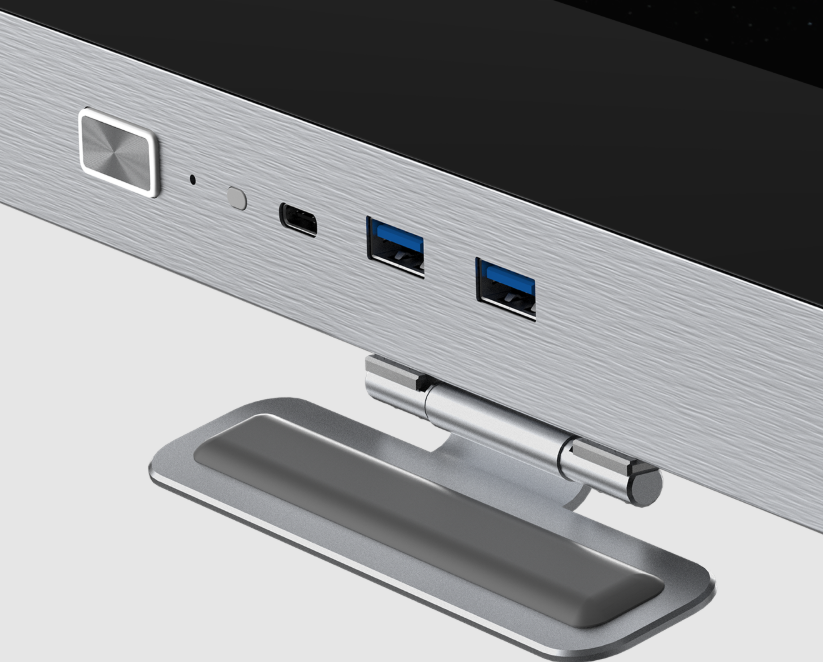
<section><h2>整机外观<a href="#整机外观"><span>#</span></a></h2><p>一体化辊扎浅灰色金属边框,无摄像头,下边框与5代高教HxxEV相似</p><p>扬声器顶置,接口挡板外挂,屏蔽启用安卓桌面功能</p><p>常规情况下OPS通道下的中控,侧边栏由”希沃桌面”提供</p><p>侧边栏为条形,7代普销同款UI,OPS通道下抓不到UDI端口或使用国产化模块时将<strong>自动启用安卓中控</strong></p><img src="https://pic2.ziyuan.wang/user/tanxifei/2026/06/7.5分销_c45384253b334.webp" /><blockquote><p>7.5代分销,来自QQ用户“舞动的炫纹”</p></blockquote></section>
<section><h2>前面板搭配<a href="#前面板搭配"><span>#</span></a></h2><p>椭圆形中空电源键+1x USB Type-C(全功能)+2x USB3.0(5Gbps全通道)</p></section>]]></content>
    </entry>
    <entry>
      <id>https://swillus.sylvanruan.top/posts/px-f8/</id>
      <title type="text">八代交互智能平板</title>
      <published>2026-06-19T00:00:00.000Z</published>
      <updated>2026-06-19T00:00:00.000Z</updated>
      <author><name>庄方宜</name></author>
      <link rel="alternate" href="https://swillus.sylvanruan.top/posts/px-f8/"/>
      <summary type="text">F系列八代交互智能平板(FHxxEC、FHxxEA、FHxxEB)</summary>
      <content type="html"><![CDATA[<section><h2>基板型号:<a href="#基板型号"><span>#</span></a></h2>

<table><thead><tr><th><div> 基板型号</div></th><th><div> 尺寸</div></th><th><div> 平台</div></th></tr></thead><tbody><tr><td>FHxxEC</td><td>65、75、86</td><td>TP.MP620</td></tr><tr><td>FHxxEA</td><td>75、86、98</td><td>TP.MP620</td></tr><tr><td>FHxxEB</td><td>86</td><td>RK3576</td></tr></tbody></table></section>
<section><h2>安卓版本:<a href="#安卓版本"><span>#</span></a></h2><p>Android 15</p></section>
<section><h2>较大的变化<a href="#较大的变化"><span>#</span></a></h2><p><strong>全系取消红外遥控接收器</strong></p><p>普销分为三个版本：FHxxEC战斗款，FHxxEA经典款，FHxxEB旗舰款</p><p>其中FHxxEB可配置算力模块，运行离线希沃教学大模型</p><p>FHxxEC摄像头改成外挂式，并移除了U盘挡板选配</p><p>常规情况下OPS通道下的中控，侧边栏由”希沃桌面”提供</p></section>
<section><h2>整机外观<a href="#整机外观"><span>#</span></a></h2><section><h3>FHxxEC(战斗款)<a href="#fhxxec战斗款"><span>#</span></a></h3><p>一体化辊扎浅灰色金属边框，单摄像头</p><p>扬声器顶置，摄像头顶置，按钮为银主体+黑图标，呈椭圆状，接口挡板外挂</p><img src="/jhpbGen7/PX7-4.png" /><blockquote><p>设备渲染图</p></blockquote></section><section><h3>FHxxEA(经典款)<a href="#fhxxea经典款"><span>#</span></a></h3><p>铝挤边框，上下银灰色边框、左右黑色边框，融合3+1摄像头</p><p><strong>扬声器顶置</strong>，摄像头顶置，按钮为银主体+黑图标，呈椭圆状，接口挡板外挂</p>

<table><thead><tr><th><div> 整机正面</div></th><th><img src="/jhpbGen7/PX7-2.webp" /></th></tr></thead><tbody><tr><td>前面板</td><td><img src="/jhpbGen7/PX7-3.webp" /></td></tr></tbody></table></section><section><h3>FHxxEB(旗舰款)<a href="#fhxxeb旗舰款"><span>#</span></a></h3><p><strong><span>可配置算力模块</span></strong><span>,七代唯一一款最大98寸的交互平板</span></p><p>铝挤边框，深空灰配色，上边框金属拉丝+喷砂工艺，融合3+1摄像头</p><p>扬声器顶置，摄像头顶置，按钮为深灰主体+黑图标，呈椭圆状，<strong>接口挡板内嵌</strong></p><img src="https://pic2.ziyuan.wang/user/tanxifei/2025/12/FG86EB渲染图_3bb1190f30d3c.webp" /><blockquote><p>设备渲染图</p></blockquote></section></section>
<section><h2>前面板搭配<a href="#前面板搭配"><span>#</span></a></h2><p>按键：整机电源键+护眼模式键+中控键(齿轮键)+音量键+轻录播键</p><p>前面板接口：1x USB Type-C(全功能)+2x USB3.0(5Gbps全通道)</p></section>
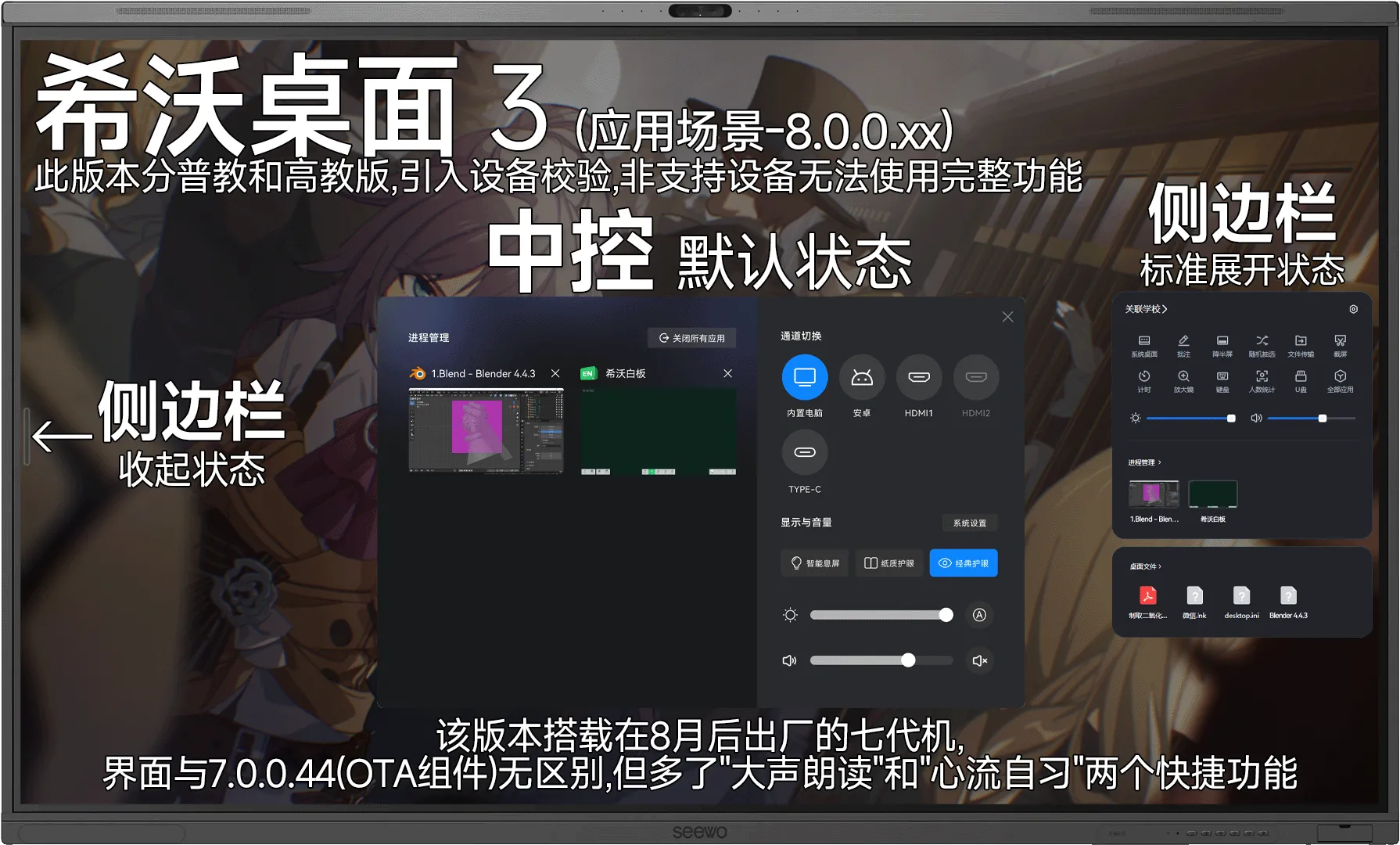
<section><h2>杂项<a href="#杂项"><span>#</span></a></h2><section><h3>1.关于接口<a href="#1关于接口"><span>#</span></a></h3><section><h4>前面板<a href="#前面板"><span>#</span></a></h4><p>Type-C仍然无法直通其他通道，只有USB2.0速率，不建议插移动存储设备</p></section><section><h4>侧边接口板<a href="#侧边接口板"><span>#</span></a></h4><p>可选配”HDMI OUT”接口</p></section></section><section><h3>2.关于希沃桌面<a href="#2关于希沃桌面"><span>#</span></a></h3><section><h4>希沃桌面2.0<a href="#希沃桌面20"><span>#</span></a></h4><p>早期7代出厂预装的版本</p><img src="https://pic2.ziyuan.wang/user/tanxifei/2025/12/FG86EB2.0桌面_e00973611055b.webp" /><blockquote><p>2.0 UI</p></blockquote></section><section><h4>希沃桌面2.5<a href="#希沃桌面25"><span>#</span></a></h4><p>该版本桌面分普教与高教</p><p>最常见的预装版本</p><img src="https://pic2.ziyuan.wang/user/tanxifei/2025/12/FG86EB2.5桌面正式_fe1e7a1b6feee.webp" /><blockquote><p>2.5 UI</p></blockquote></section><section><h4>希沃桌面3.0<a href="#希沃桌面30"><span>#</span></a></h4><p>该版本桌面分普教与高教</p><p>25年8月后出厂的预装版本，引入UDI设备校验功能，非希沃设备只可使用”阉割”版侧边栏和桌面</p><img src="https://pic2.ziyuan.wang/user/tanxifei/2025/12/FG86EB 3.0桌面_563c8f1b63de1.webp" /><blockquote><p>3.0 UI</p></blockquote></section></section></section>]]></content>
    </entry>
    <entry>
      <id>https://swillus.sylvanruan.top/posts/px-f7/</id>
      <title type="text">七代交互智能平板</title>
      <published>2026-05-19T00:00:00.000Z</published>
      <updated>2026-05-19T00:00:00.000Z</updated>
      <author><name>庄方宜</name></author>
      <link rel="alternate" href="https://swillus.sylvanruan.top/posts/px-f7/"/>
      <summary type="text">F系列七代交互智能平板(FGxxEC、FGxxEA、FGxxEB)</summary>
      <content type="html"><![CDATA[<section><h2>基板型号:<a href="#基板型号"><span>#</span></a></h2>

<table><thead><tr><th><div> 基板型号</div></th><th><div> 平台</div></th></tr></thead><tbody><tr><td>FGxxEC</td><td>T982</td></tr><tr><td>FGxxEA</td><td>T982</td></tr><tr><td>FGxxEB</td><td>A311D2</td></tr></tbody></table></section>
<section><h2>如何分辨7代和7.5代(预览):<a href="#如何分辨7代和75代预览"><span>#</span></a></h2><p>7.5代普销仅有战斗和经典款</p>

<table><thead><tr><th><div> 代数</div></th><th><div> 安卓版本</div></th><th><div> 研发代号</div></th></tr></thead><tbody><tr><td>7</td><td>13/14</td><td>战斗：FGxxEC-CS3182A-E<br />经典：FG65/75EA-CS3182A-E<br />FG86EA-B01182A-E<br />FG90EA-B01082A-E<br />旗舰：FGxxEB-CS51D2A-E</td></tr><tr><td>7.5</td><td>14</td><td>战斗：FG65/75EC-CS3182E-B<br />FG86EC-CS5182E-E<br />经典：FG75EA-CS3182E-E<br />FG86EA-CS5182E-B</td></tr></tbody></table></section>
<section><h2>安卓版本:<a href="#安卓版本"><span>#</span></a></h2><p>Android 13，Android14</p></section>
<section><h2>较大的变化<a href="#较大的变化"><span>#</span></a></h2><p>普销分为三个版本：FGxxEC战斗款，FGxxEA经典款，FGxxEB旗舰款</p><p>其中FGxxEB可配置算力模块，运行离线希沃教学大模型</p><p>常规情况下OPS通道下的中控，侧边栏由”希沃桌面”提供</p><p>与六代机不同的是，OPS通道下抓不到UDI端口或使用国产化模块时将<strong>自动启用安卓中控</strong></p></section>
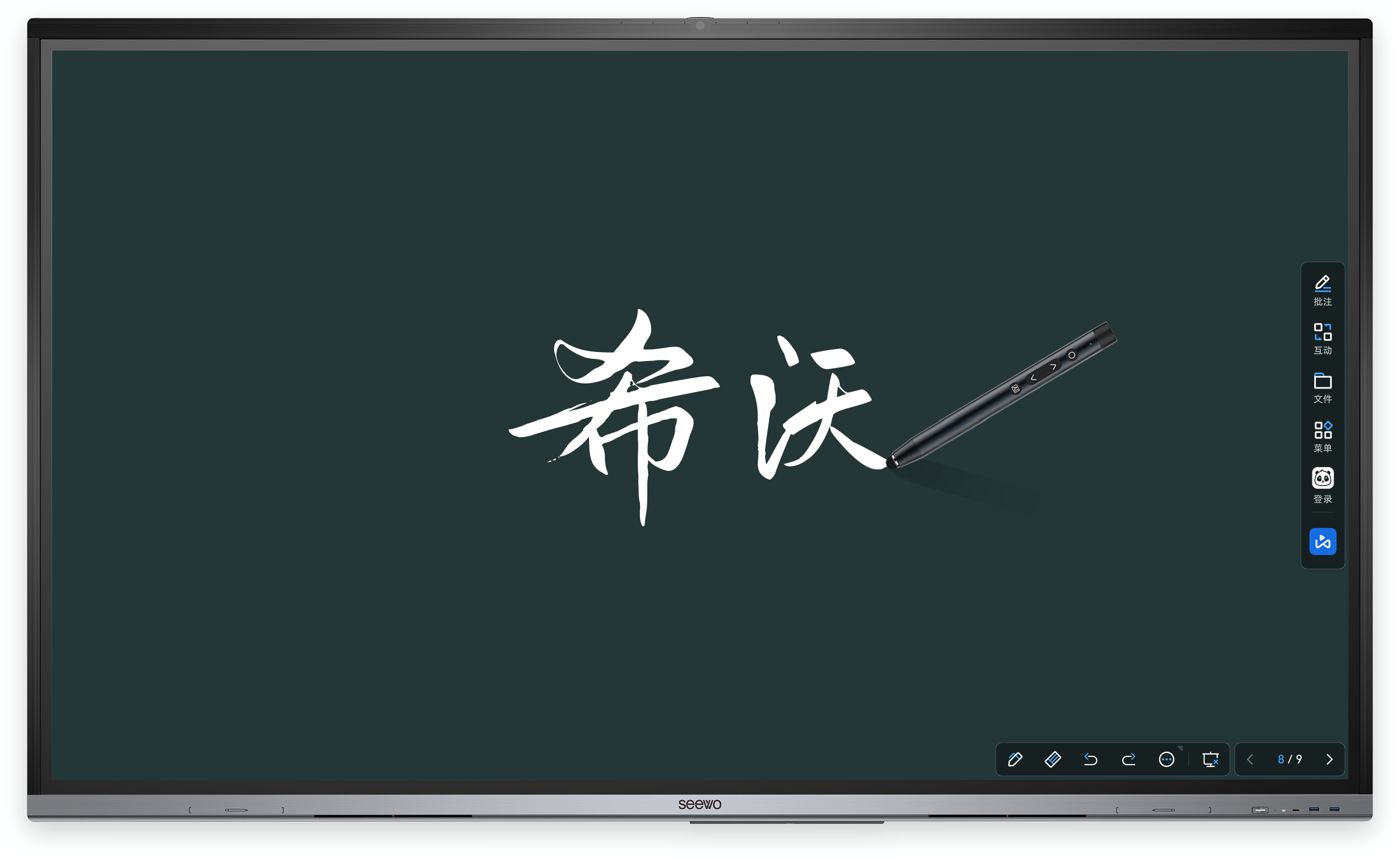
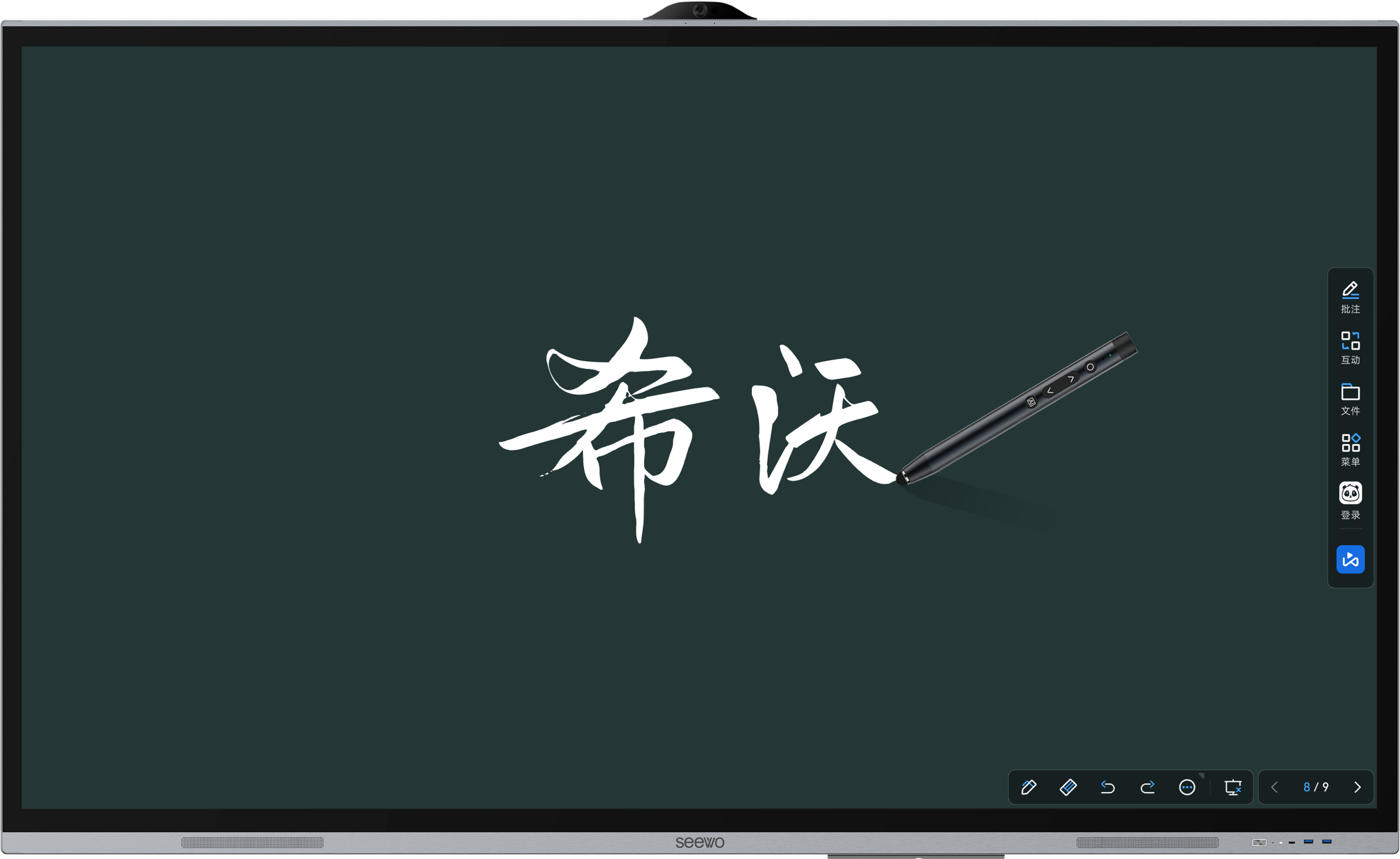
<section><h2>整机外观<a href="#整机外观"><span>#</span></a></h2><section><h3>FGxxEC(战斗款)<a href="#fgxxec战斗款"><span>#</span></a></h3><p>一体化辊扎浅灰色金属边框，单摄像头</p><p>扬声器顶置，摄像头顶置，按钮为银主体+黑图标，呈椭圆状，接口挡板外挂</p><img src="/jhpbGen7/PX7-4.png" /><blockquote><p>设备渲染图</p></blockquote></section><section><h3>FGxxEA(经典款)<a href="#fgxxea经典款"><span>#</span></a></h3><p>铝挤边框，上下银灰色边框、左右黑色边框，融合3+1摄像头</p><p><strong>扬声器顶置</strong>，摄像头顶置，按钮为银主体+黑图标，呈椭圆状，接口挡板外挂</p>

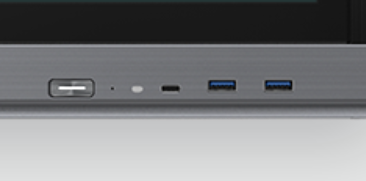
<table><thead><tr><th><div> 整机正面</div></th><th><img src="/jhpbGen7/PX7-2.webp" /></th></tr></thead><tbody><tr><td>前面板</td><td><img src="/jhpbGen7/PX7-3.webp" /></td></tr></tbody></table></section><section><h3>FGxxEB(旗舰款)<a href="#fgxxeb旗舰款"><span>#</span></a></h3><p><strong><span>可配置算力模块</span></strong><span>,七代唯一一款最大98寸的交互平板</span></p><p>铝挤边框，深空灰配色，上边框金属拉丝+喷砂工艺，融合3+1摄像头</p><p>扬声器顶置，摄像头顶置，按钮为深灰主体+黑图标，呈椭圆状，<strong>接口挡板内嵌</strong></p><img src="https://pic2.ziyuan.wang/user/tanxifei/2025/12/FG86EB渲染图_3bb1190f30d3c.webp" /><blockquote><p>设备渲染图</p></blockquote></section></section>
<section><h2>前面板搭配<a href="#前面板搭配"><span>#</span></a></h2><p>按键：整机电源键+护眼模式键+中控键(齿轮键)+音量键+轻录播键</p><p>前面板接口：1x USB Type-C(全功能)+2x USB3.0(5Gbps全通道)</p></section>
<section><h2>杂项<a href="#杂项"><span>#</span></a></h2><section><h3>1.关于接口<a href="#1关于接口"><span>#</span></a></h3><section><h4>前面板<a href="#前面板"><span>#</span></a></h4><p>Type-C仍然无法直通其他通道，只有USB2.0速率，不建议插移动存储设备</p></section><section><h4>侧边接口板<a href="#侧边接口板"><span>#</span></a></h4><p>可选配”HDMI OUT”接口</p></section></section><section><h3>2.关于希沃桌面<a href="#2关于希沃桌面"><span>#</span></a></h3><section><h4>希沃桌面2.0<a href="#希沃桌面20"><span>#</span></a></h4><p>早期7代出厂预装的版本</p><img src="https://pic2.ziyuan.wang/user/tanxifei/2025/12/FG86EB2.0桌面_e00973611055b.webp" /><blockquote><p>2.0 UI</p></blockquote></section><section><h4>希沃桌面2.5<a href="#希沃桌面25"><span>#</span></a></h4><p>该版本桌面分普教与高教</p><p>最常见的预装版本</p><img src="https://pic2.ziyuan.wang/user/tanxifei/2025/12/FG86EB2.5桌面正式_fe1e7a1b6feee.webp" /><blockquote><p>2.5 UI</p></blockquote></section><section><h4>希沃桌面3.0<a href="#希沃桌面30"><span>#</span></a></h4><p>该版本桌面分普教与高教</p><p>25年8月后出厂的预装版本，引入UDI设备校验功能，非希沃设备只可使用”阉割”版侧边栏和桌面</p><img src="https://pic2.ziyuan.wang/user/tanxifei/2025/12/FG86EB 3.0桌面_563c8f1b63de1.webp" /><blockquote><p>3.0 UI</p></blockquote></section></section></section>]]></content>
    </entry>
    <entry>
      <id>https://swillus.sylvanruan.top/posts/pxgj-f5/</id>
      <title type="text">五代交互智能平板</title>
      <published>2026-01-02T00:00:00.000Z</published>
      <updated>2026-01-02T00:00:00.000Z</updated>
      <author><name>庄方宜</name></author>
      <link rel="alternate" href="https://swillus.sylvanruan.top/posts/pxgj-f5/"/>
      <summary type="text">F系列五代交互智能平板(FxxED/FxxEV/HVxxEA/EVxxEV)</summary>
      <content type="html"><![CDATA[<section><h2>基板型号:<a href="#基板型号"><span>#</span></a></h2><p>FxxED(普教六按键)/FxxEV(普教单按键)/HxxEV、HVxxEA(高教) /EVxxEV(高教)</p></section>
<section><h2>安卓版本:<a href="#安卓版本"><span>#</span></a></h2><p>Android9.0(T972)</p></section>
<section><h2>较大的变化<a href="#较大的变化"><span>#</span></a></h2><p>长按关机UI更改</p><img src="https://pic2.ziyuan.wang/user/tanxifei/2026/10/PX5-6_d1da6ea1ea0a8.webp" /></section>
<section><h2>整机外观<a href="#整机外观"><span>#</span></a></h2><section><h3>普教FxxED<a href="#普教fxxed"><span>#</span></a></h3><p>FxxED可选<strong>55,65,75,86</strong>寸,摄像头改为顶置,出现U盘挡版(完全合上后打开困难)和全功能USB-C接口</p><p>边框再次收窄，侧边栏和长按关机UI更换</p>

<table><thead><tr><th><div> 中控和侧边栏</div></th><th><img src="https://pic2.ziyuan.wang/user/tanxifei/2025/02/DSC_0018_ae31b498e5630.jpg" /></th></tr></thead><tbody><tr><td>USB挡板</td><td><img src="https://pic2.ziyuan.wang/user/tanxifei/2025/02/DSC_0024_edit_44836345265032_0537707d058a8.jpg" /></td></tr></tbody></table></section><section><h3>普教FxxEV<a href="#普教fxxev"><span>#</span></a></h3><p>整体外观与FxxED一致，正面只有一个按键</p><img src="https://pic2.ziyuan.wang/user/tanxifei/2025/02/7c2ff8e52b432dc04a5fe289535a7f91_3a5094448c497.jpg" /></section><section><h3>高教红外HxxEV、HVxxEA<a href="#高教红外hxxevhvxxea"><span>#</span></a></h3><p>摄像头顶置,出现U盘挡版和全功能USB-C接口，边框偏灰色</p><p>配置隐藏式扬声器，标配HDMI OUT 支持书写笔磁吸附，提笔自动进入批注功能</p><img src="https://pic2.ziyuan.wang/user/tanxifei/2025/12/F5H_ab32a4ce01d3a.png" /></section><section><h3>高教电容EVxxEV<a href="#高教电容evxxev"><span>#</span></a></h3><p>摄像头顶置且突出,出现U盘挡版和全功能USB-C接口，上下边框浅灰色</p><img src="https://pic2.ziyuan.wang/user/tanxifei/2025/12/F5D_1b474e32b740c.png" /></section></section>
<section><h2>前面板搭配<a href="#前面板搭配"><span>#</span></a></h2><section><h3>普教红外FxxED<a href="#普教红外fxxed"><span>#</span></a></h3><p>按键：整机电源键+护眼模式键+中控键(齿轮键)+音量键+轻录播键</p><p>前面板接口：1x USB Type-C(全功能)+2x USB3.0(5Gbps全通道,可能因为Bug变成风味3.0)</p></section><section><h3>普教红外FxxEV/高教红外HxxEV、HVxxEA/高教电容EVxxEV<a href="#普教红外fxxev高教红外hxxevhvxxea高教电容evxxev"><span>#</span></a></h3><p>(仅HVxxEA)触摸笔吸附区(带霍尔)</p><p>按键：整机电源键</p><p>前面板接口：1x USB Type-C(全功能)+2x USB3.0(5Gbps全通道)</p>

<table><thead><tr><th><div> 机型</div></th><th>图片</th></tr></thead><tbody><tr><td>HxxEV、HVxxEA</td><td><img src="https://pic2.ziyuan.wang/user/tanxifei/2025/12/PixPin_2025-12-06_10-53-46_8e719f9fdf88a.png" /></td></tr><tr><td>FxxEV、EVxxEV</td><td><img src="https://pic2.ziyuan.wang/user/tanxifei/2025/12/PixPin_2025-12-06_10-50-22_7914fade9b196.png" /></td></tr></tbody></table></section></section>
<section><h2>特殊<a href="#特殊"><span>#</span></a></h2><section><h3>1.接口<a href="#1接口"><span>#</span></a></h3><p>Type-C无法直通其他通道，只有USB2.0速率且使用延迟极高，不建议插移动存储设备</p></section><section><h3>2.安卓UI<a href="#2安卓ui"><span>#</span></a></h3><p>安卓主页无时钟</p><img src="https://pic2.ziyuan.wang/user/tanxifei/2026/10/PX5-3_bdd64ee9458ca.webp" /></section></section>]]></content>
    </entry>
    <entry>
      <id>https://swillus.sylvanruan.top/posts/fx-c56/</id>
      <title type="text">五/六代分销交互智能平板</title>
      <published>2025-12-26T00:00:00.000Z</published>
      <updated>2025-12-26T00:00:00.000Z</updated>
      <author><name>庄方宜</name></author>
      <link rel="alternate" href="https://swillus.sylvanruan.top/posts/fx-c56/"/>
      <summary type="text">五/六代分销交互智能平板CxxEE/MCxxFEE</summary>
      <content type="html"><![CDATA[<section><h2>基板型号<a href="#基板型号"><span>#</span></a></h2><p><strong><span>可恶的同位体还在追我</span></strong></p>

<table><thead><tr><th><div>代数</div></th><th><div>基板型号</div></th><th><div>平台</div></th></tr></thead><tbody><tr><td>五代</td><td>CxxEE</td><td>T972</td></tr><tr><td>六代</td><td>？</td><td>T972</td></tr></tbody></table></section>
<section><h2>安卓版本<a href="#安卓版本"><span>#</span></a></h2><p>Android 9(可通过工厂菜单启用安卓通道)</p></section>
<section><h2>同位体的差异<a href="#同位体的差异"><span>#</span></a></h2><p>六代分销支持安装”希沃桌面”，出厂预装希沃桌面1.0</p><p>五代分销使用MT51M模块，六代分销使用MT61M模块</p></section>
<section><h2>整机外观<a href="#整机外观"><span>#</span></a></h2><p>两款机器正面外观与常规五代相同，无摄像头，带安卓</p><img src="https://pic2.ziyuan.wang/user/tanxifei/2026/10/FX6-1_17482d046e971.webp" /><blockquote><p>分销六代(来源于网络，侵删)</p></blockquote></section>
<section><h2>前面板搭配<a href="#前面板搭配"><span>#</span></a></h2><p>2x <strong>USB2.0</strong>(全通道)</p></section>
<section><h2>特殊<a href="#特殊"><span>#</span></a></h2><div><figure><figcaption></figcaption><pre><code><div><div><div>1</div></div><div><span>**五/六代分销解除隐藏安卓方法**</span></div></div><div><div><div>2</div></div><div><span>整机彻底关机状态下长按电源键10S到红蓝快速交替，1s后松手</span></div></div><div><div><div>3</div></div><div><span>开机后会自动进入设备诊断模式，显示"你已进入设备诊断模式"后点击屏幕右下角5-6下，直到弹出"Debug Password"</span></div></div><div><div><div>4</div></div><div><span>输入"1379"，点OK进入工厂菜单</span></div></div><div><div><div>5</div></div><div><span>找到"其他设置"，选择"启用安卓"，退出工厂菜单后重启即可</span></div></div></code></pre><div><div></div><div></div></div></figure></div></section>]]></content>
    </entry>
    <entry>
      <id>https://swillus.sylvanruan.top/posts/px-f123/</id>
      <title type="text">F系列F1~3代交互智能平板</title>
      <published>2025-12-24T00:00:00.000Z</published>
      <updated>2025-12-24T00:00:00.000Z</updated>
      <author><name>庄方宜</name></author>
      <link rel="alternate" href="https://swillus.sylvanruan.top/posts/px-f123/"/>
      <summary type="text">F系列F1~3代交互智能平板(FxxEA、FxxEB)</summary>
      <content type="html"><![CDATA[<section><h2>基板型号&amp;平台:<a href="#基板型号平台"><span>#</span></a></h2>

<table><thead><tr><th><div> 基板型号</div></th><th><div> 平台</div></th></tr></thead><tbody><tr><td>FxxEA(F1)</td><td>MSD638(安卓4.4.4)</td></tr><tr><td>FxxEB(F2，65/70寸)</td><td>三合一(安卓4.4.4)</td></tr><tr><td>FxxEB(F2，75/80/86寸)</td><td>MSD638(安卓4.4.4)</td></tr><tr><td>FxxEB(F3)</td><td>T551(安卓7.0)</td></tr></tbody></table></section>
<section><h2>较大的变化<a href="#较大的变化"><span>#</span></a></h2><section><h4>针对全系列<a href="#针对全系列"><span>#</span></a></h4><p>MSD638平台的所有设备由安卓管理无线网卡，通过<strong>希沃管家</strong>进行安Win互联</p><p>设备均带<strong>DBX</strong>音效，<strong>无</strong>外置天线</p><p>TV主板内置无线传屏接收器</p></section><section><h4>针对FxxEB<a href="#针对fxxeb"><span>#</span></a></h4><p>前置更改为USB3接口</p><p>配一键轻录播按钮，侧置USB通道可跟随切换</p><p><strong>T551平台</strong>的FxxEB(即F3)首次尝试<strong>共同管理无线网卡</strong>，但是<strong>效果稀烂</strong>，OPS天天识别不到</p></section></section>
<section><h2>整机外观<a href="#整机外观"><span>#</span></a></h2><section><h3>FxxEA<a href="#fxxea"><span>#</span></a></h3><p>激进地尝试窄边框(侧边触摸框)，其余外观特征与S2相同</p>

<table><thead><tr><th><div> 正面渲染图</div></th><th>无图</th></tr></thead><tbody><tr><td>前面板</td><td><img src="https://pic2.ziyuan.wang/user/tanxifei/2026/10/F1-1_df38a11ce7146.jpg" /></td></tr></tbody></table></section><section><h3>FxxEB<a href="#fxxeb"><span>#</span></a></h3><p>侧边触摸框黑色，上下边框银色，下边框较粗</p>

<table><thead><tr><th><div> 正面图</div></th><th><img src="https://pic2.ziyuan.wang/user/tanxifei/2026/10/F2-2_2d25836987337.webp" /></th></tr></thead><tbody><tr><td>前面板</td><td><img src="https://pic2.ziyuan.wang/user/tanxifei/2026/10/F2-1_3b71ee212a6bc.webp" /></td></tr></tbody></table></section></section>
<section><h2>前面板搭配<a href="#前面板搭配"><span>#</span></a></h2><section><h3>FxxEA<a href="#fxxea-1"><span>#</span></a></h3><p>按键：整机电源键</p><p>前面板接口：2x USB2.0(全通道)</p></section><section><h3>FxxEB<a href="#fxxeb-1"><span>#</span></a></h3><p>按键：整机电源键+安卓主页键+中控键(齿轮键)+音量键+轻录播键</p><p>前面板接口：3x USB3.0(5Gbps全通道)</p></section></section>
<section><h2>特殊<a href="#特殊"><span>#</span></a></h2><p>FxxEB(F2)是<strong>选配侧边摄像头</strong></p><section><h4><img src="https://pic2.ziyuan.wang/user/tanxifei/2025/02/DSC_0029_f3d933938e25c.jpg" /></h4><blockquote><p>侧边摄像头</p></blockquote><p>**FxxEB(F2)**有两种不同的标签样式</p>

<table><thead><tr><th><img src="https://pic2.ziyuan.wang/user/tanxifei/2025/02/DSC_0035_edit_44672814512453_ba4f35a2c06cc.jpg" /></th><th><img src="https://pic2.ziyuan.wang/user/tanxifei/2025/02/DSC_0034_edit_44747952886400_4d2a37d5e228a.jpg" /></th></tr></thead></table></section></section>]]></content>
    </entry>
    <entry>
      <id>https://swillus.sylvanruan.top/posts/px-s123/</id>
      <title type="text">S系列1~2代交互智能平板</title>
      <published>2025-12-23T00:00:00.000Z</published>
      <updated>2025-12-23T00:00:00.000Z</updated>
      <author><name>庄方宜</name></author>
      <link rel="alternate" href="https://swillus.sylvanruan.top/posts/px-s123/"/>
      <summary type="text">S系列交互智能平板(SxxEA、SxxEB、SxxEC)</summary>
      <content type="html"><![CDATA[<section><h2>基板型号:<a href="#基板型号"><span>#</span></a></h2><p><strong>-SxxEA</strong>(S1)(MSD608.71平台,安卓4.2.1)</p><p><strong>-SxxEB、SxxEC</strong>(S2)(MSD638平台,安卓4.4.4)</p></section>
<section><h2>整机外观<a href="#整机外观"><span>#</span></a></h2><section><h3>SxxEA(S1)<a href="#sxxeas1"><span>#</span></a></h3><p>触摸框银色，触摸框转角和下边框灰色</p><p>最早带有”侧边栏”的希沃机种</p><img src="https://pic2.ziyuan.wang/user/tanxifei/2025/12/SxxEA正面_2cab429d5ed68.jpg" /><blockquote><p>感谢@哈吉米 提供图片</p></blockquote></section><section><h3>SxxEB、SxxEC(S2)<a href="#sxxebsxxecs2"><span>#</span></a></h3><p>左右触摸框黑色，上下触摸框和下边框深灰色</p><p>首款支持”有线网一线通”和”USB跟随”的设备，标配HDMI OUT接口</p><p>SxxEC开始有全局侧边栏</p></section></section>
<section><h2>前面板搭配<a href="#前面板搭配"><span>#</span></a></h2><section><h3>SxxEA(S1)<a href="#sxxeas1-1"><span>#</span></a></h3><p><strong>前面板接口位于下边框左侧，按键位于下边框右侧</strong></p><p>按键：整机电源键+安卓返回/主页键+中控键(齿轮键)+音量键</p><p>前面板接口：2x USB(PC)+1x USB2.0(Android)</p></section><section><h3>SxxEB、SxxEC(S2)<a href="#sxxebsxxecs2-1"><span>#</span></a></h3><p><strong>前面板接口与按键均位于下边框右侧</strong></p><p>按键：整机电源键+安卓主页键+中控键(齿轮键)+音量键+轻录播键</p><p>前面板接口：1x USB3.0(5Gbps全通道)+2x USB2.0(全通道)</p></section></section>
<section><h2>杂项<a href="#杂项"><span>#</span></a></h2><p>SxxEA配置MT08/MT11 PC模块，SxxEB/EC配置MT15/MT21 PC模块</p></section>]]></content>
    </entry>
    <entry>
      <id>https://swillus.sylvanruan.top/posts/pxgj-f6/</id>
      <title type="text">六代交互智能平板</title>
      <published>2025-12-09T00:00:00.000Z</published>
      <updated>2025-12-09T00:00:00.000Z</updated>
      <author><name>庄方宜</name></author>
      <link rel="alternate" href="https://swillus.sylvanruan.top/posts/pxgj-f6/"/>
      <summary type="text">F系列六代交互智能平板(FFxxEA、FFxxEB)</summary>
      <content type="html"><![CDATA[<section><h2>基板型号:<a href="#基板型号"><span>#</span></a></h2><p>FFxxEA/FFxxEB</p></section>
<section><h2>安卓版本:<a href="#安卓版本"><span>#</span></a></h2><p>Android 11(T982)</p></section>
<section><h2>较大的变化<a href="#较大的变化"><span>#</span></a></h2><p>无线网卡更换为为AIC8800，支持WIFI6，安卓/OPS共享</p><p>新增顶置4阵列麦克风与顶置2.2声道扬声器</p><p>OPS通道下的的中控，侧边栏由”希沃桌面”提供，<strong>没有在OPS通道提供安卓中控</strong>，破坏<em>UDI/UPS</em>任一即可打断安Win互联</p><p>对于六代机，不安装<strong>完整</strong>的 <strong>希沃桌面全家桶</strong>，将无法调整机器亮度，切换通道，使用侧边栏快捷工具</p><p>六代智慧黑板甚至会出现<strong>触摸失效</strong>，<strong>无法息屏</strong>等玄学问题</p></section>
<section><h2>整机外观<a href="#整机外观"><span>#</span></a></h2><section><h3>FF65EA、FF75EA、FF86EA(经典款)<a href="#ff65eaff75eaff86ea经典款"><span>#</span></a></h3><p><strong>上下边框银色，左右边框黑色</strong></p><p><strong>扬声器顶置</strong>,摄像头顶置,右下角接口挡板加了一个”圆弧”便于打开,按钮配色为银主体+黑图标</p>

<table><thead><tr><th><div> 整机正面</div></th><th><img src="/jhpbGen6/PX6-2.webp" /></th></tr></thead><tbody><tr><td>前面板</td><td><img src="https://pic2.ziyuan.wang/user/tanxifei/2025/02/DSC_0043_4219fe77294e0.jpg" /></td></tr><tr><td>长按关机UI<br />(复古)</td><td><img src="/jhpbGen6/PX6-9.webp" /></td></tr><tr><td>NFC基础版(选配)</td><td><img src="/jhpbGen6/PX6-1.webp" /></td></tr></tbody></table></section><section><h3>FFxxEB(旗舰款)<a href="#ffxxeb旗舰款"><span>#</span></a></h3><p><strong>上、左右边框深灰色，下边框银色</strong></p><p><strong>扬声器顶置</strong>,摄像头顶置,按钮配色为银主体+黑图标,接口挡板内嵌</p><p>带NFC基础版(左下角)/全功能NFC高配版(按键板区域）</p>

<table><thead><tr><th><div> 设备渲染图</div></th><th><img src="/jhpbGen6/PX6U-1.webp" /></th></tr></thead><tbody><tr><td>前面板</td><td><img src="/jhpbGen6/PX6U-2.png" /></td></tr></tbody></table></section><section><h3>FF98EA(特殊)<a href="#ff98ea特殊"><span>#</span></a></h3><p><strong><span>整机边框浅灰色</span></strong></p><p><span>扬声器为下置隐藏式</span>,摄像头顶置,按钮配色为银主体+黑图标,带NFC基础版和全功能NFC高配版</p><img src="/jhpbGen6/PX6H-1.jpg" /><blockquote><p>感谢@水糯米SNOW提供图片</p></blockquote></section></section>
<section><h2>前面板搭配<a href="#前面板搭配"><span>#</span></a></h2><section><h3>FF65EA、FF75EA、FF86EA(经典款)<a href="#ff65eaff75eaff86ea经典款-1"><span>#</span></a></h3><p>按键：整机电源键+护眼模式键+中控键(齿轮键)+音量键+轻录播键</p><p>前面板接口：1x USB Type-C(全功能)+2x USB3.0(5Gbps全通道)</p><p>左下角可能有NFC基础版模块</p></section><section><h3>FFxxEB(旗舰款)/FF98EA<a href="#ffxxeb旗舰款ff98ea"><span>#</span></a></h3><p>按键：整机电源键+护眼模式键+中控键(齿轮键)+音量键+轻录播键</p><p>前面板接口：1x USB Type-C(全功能)+2x USB3.0(5Gbps全通道)</p><p>标配全功能NFC高配版，可与NFC基础版共存</p></section></section>
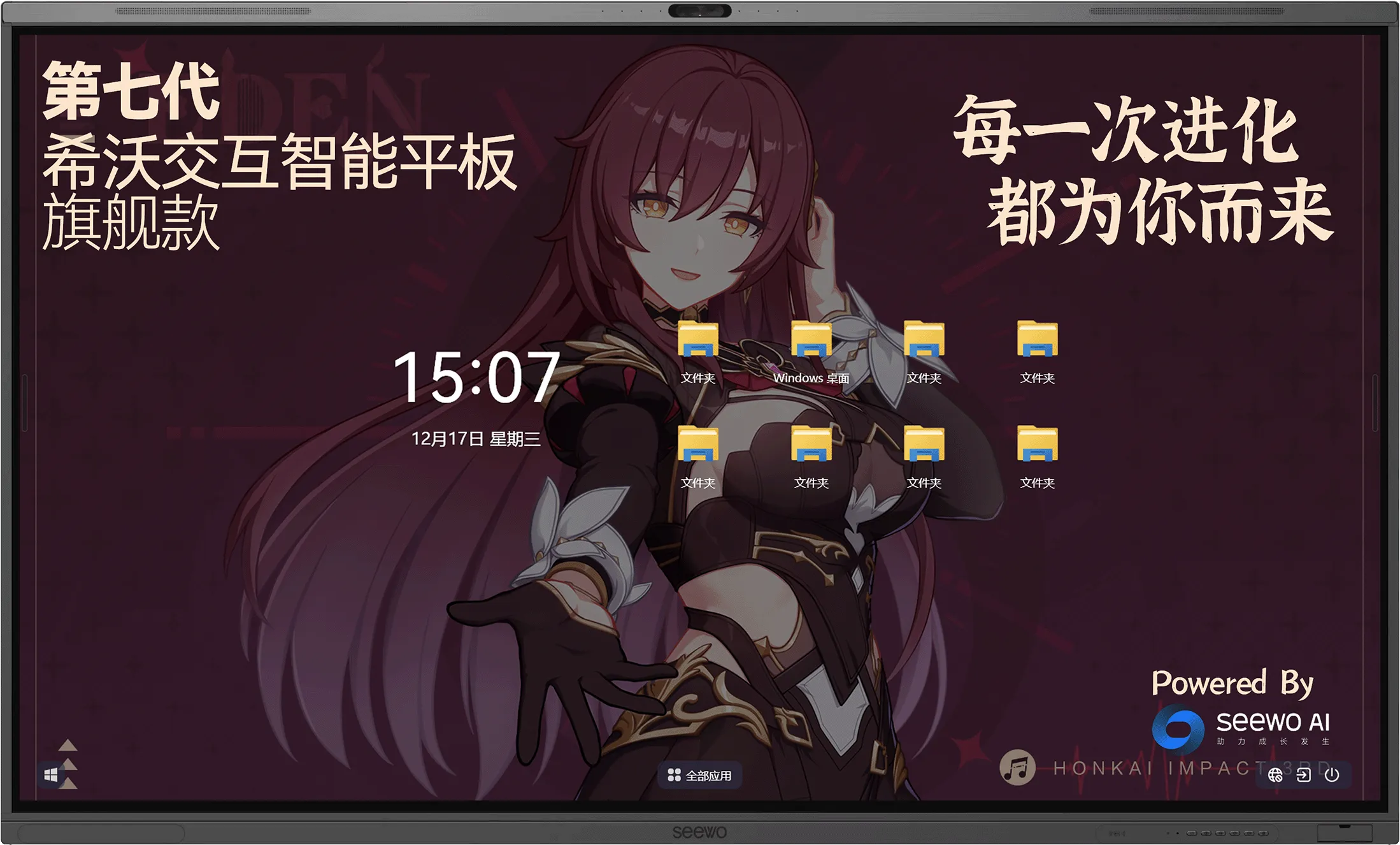
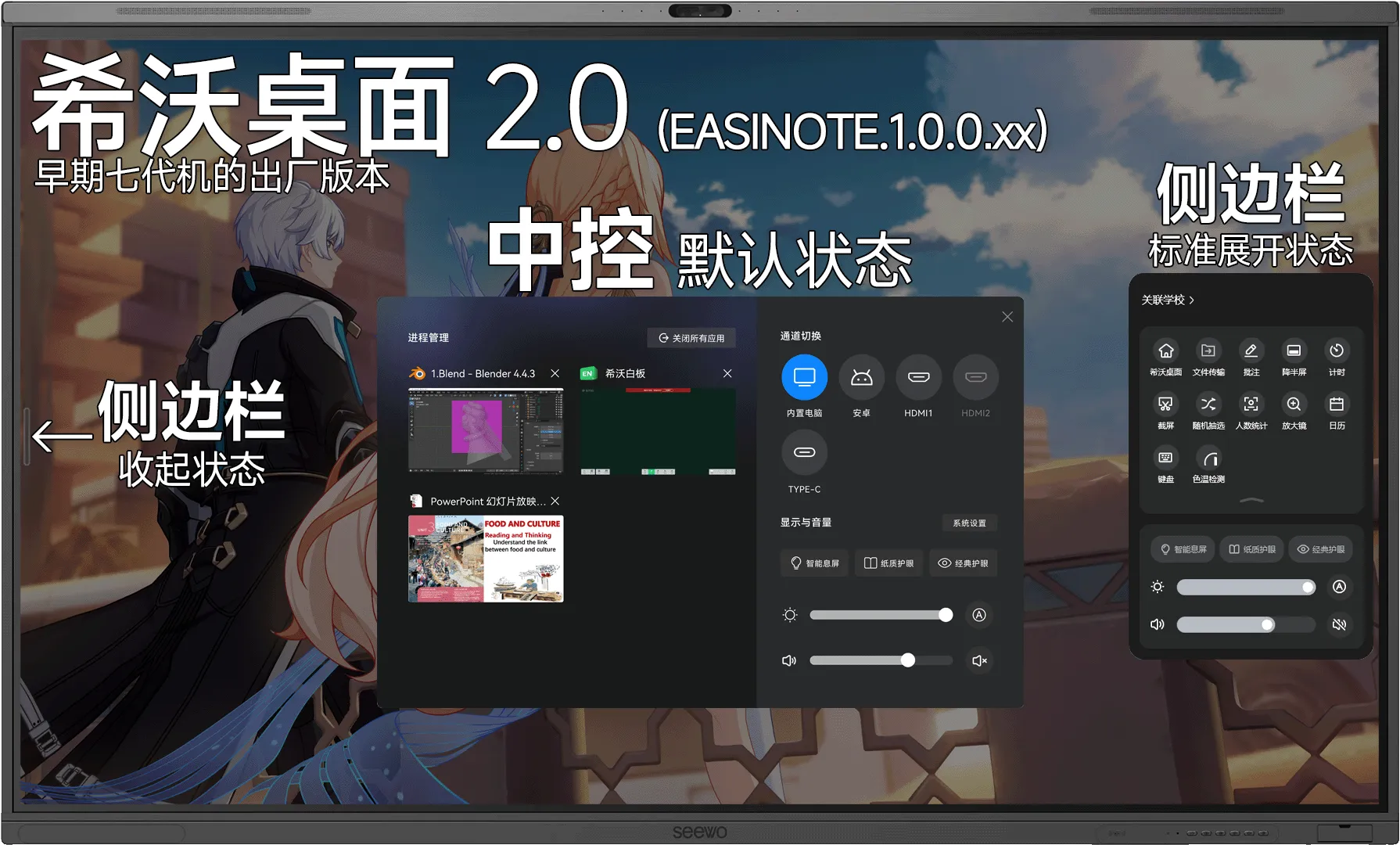
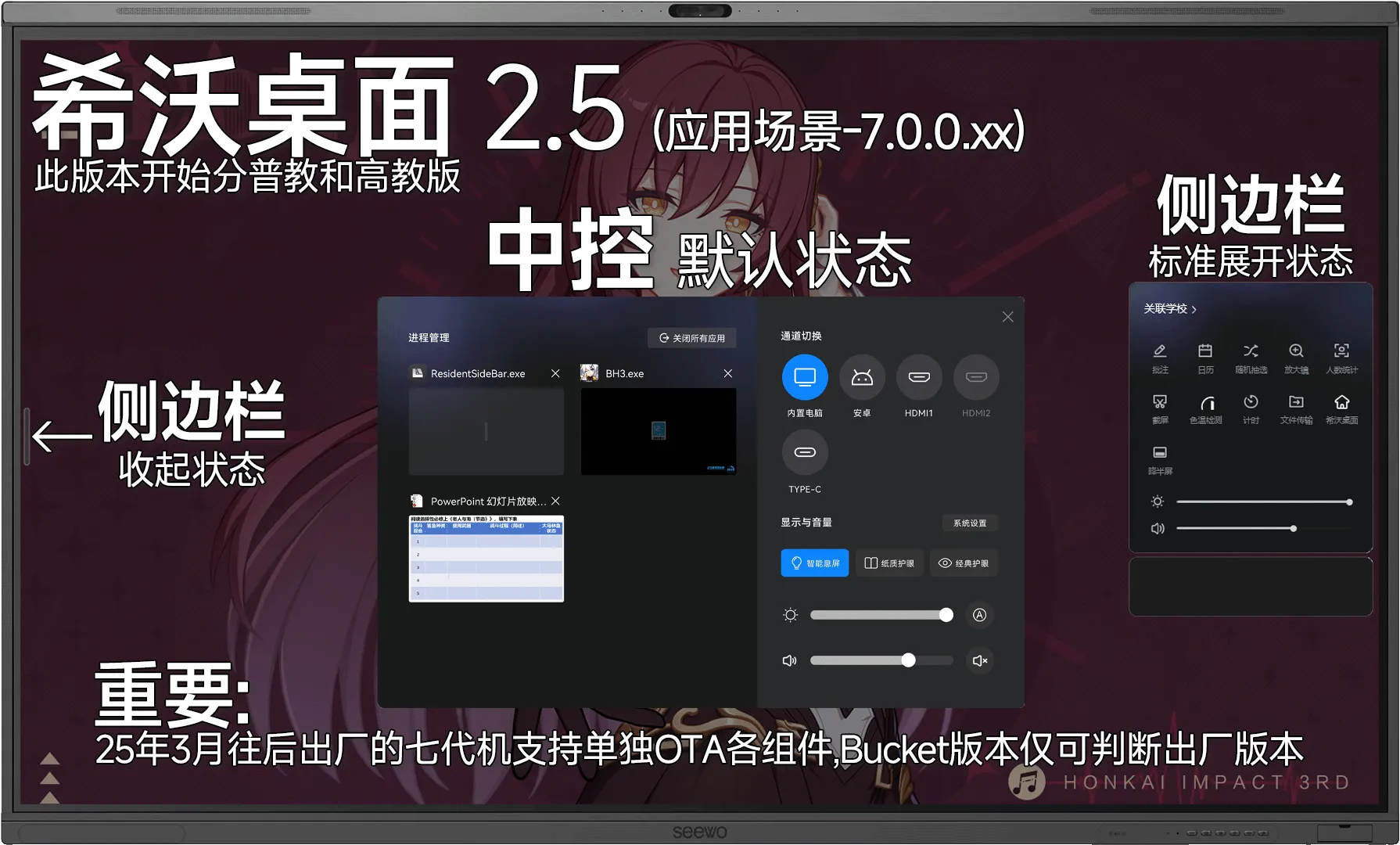
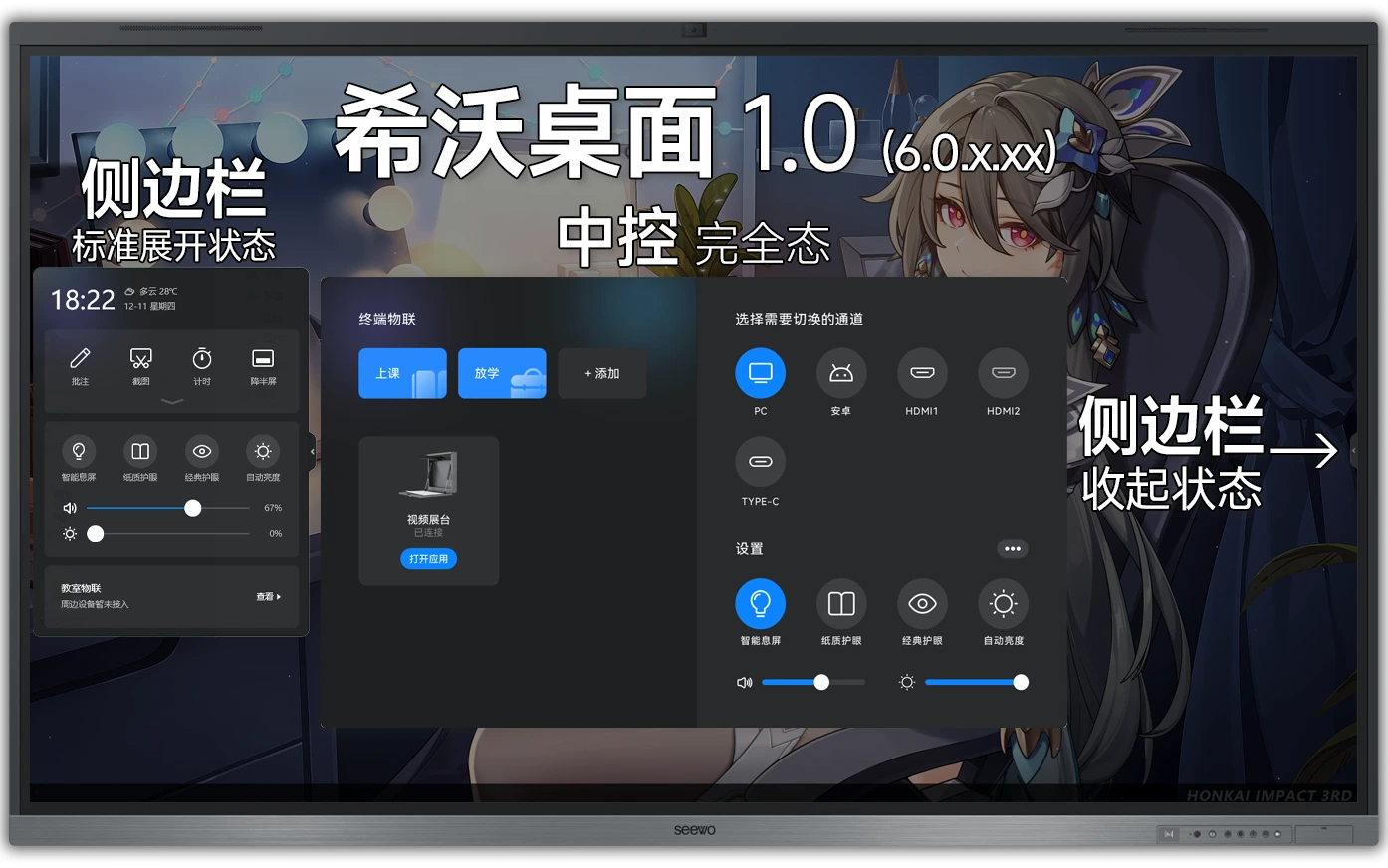
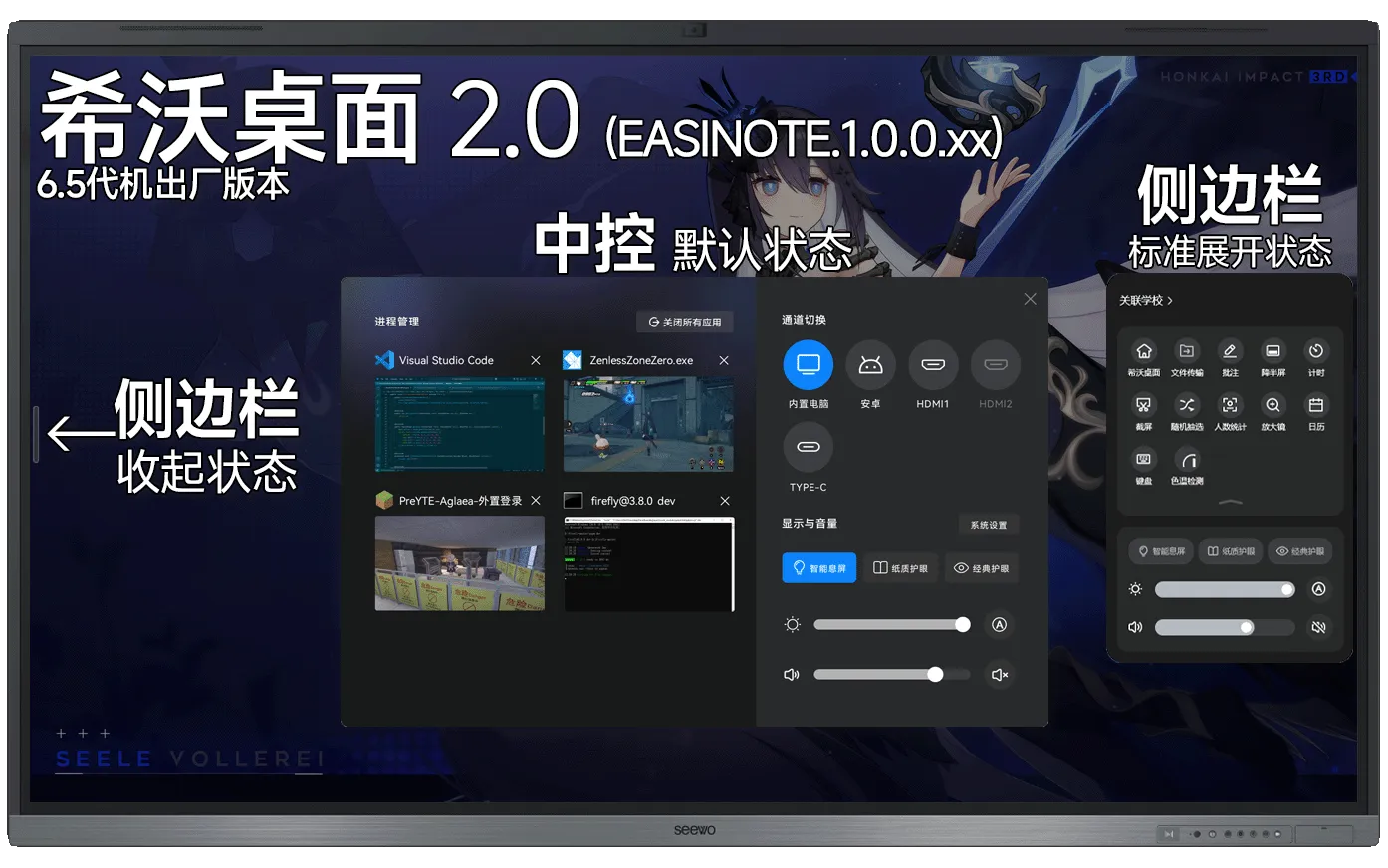
<section><h2>特殊<a href="#特殊"><span>#</span></a></h2><section><h3>1.关于接口<a href="#1关于接口"><span>#</span></a></h3><section><h4>前面板<a href="#前面板"><span>#</span></a></h4><p>Type-C无法直通其他通道，只有USB2.0速率，不建议插移动存储设备</p></section><section><h4>侧边接口板<a href="#侧边接口板"><span>#</span></a></h4><p>FF98EA相比其他机型增加一个”HDMI OUT接口”</p></section></section><section><h3>2.关于希沃桌面<a href="#2关于希沃桌面"><span>#</span></a></h3><p>6代预装希沃桌面1.0(版本号S.6.0.0.xx)，6.5代预装希沃桌面2.0(版本号EASINOTE.1.0.0.xx)或2.5(版本号7.0.0.xx,分普教和高教)，版本为机器<strong>出厂</strong>时<strong>最新版本</strong></p><section><h4>桌面1.0:<a href="#桌面10"><span>#</span></a></h4><img src="https://pic2.ziyuan.wang/user/tanxifei/2025/12/1.0桌面_29ecaef6efdcf.webp" /></section><section><h4>桌面2.0:<a href="#桌面20"><span>#</span></a></h4><img src="https://pic2.ziyuan.wang/user/tanxifei/2025/12/2.0桌面最终_f4ec5bd6a0060.webp" /></section><section><h4>桌面2.5:<a href="#桌面25"><span>#</span></a></h4><img src="https://pic2.ziyuan.wang/user/tanxifei/2025/12/2.5桌面最终_5952b44f6ea75.webp" /></section></section><section><h3>3.安卓加入悬浮导航<a href="#3安卓加入悬浮导航"><span>#</span></a></h3><img src="https://pic2.ziyuan.wang/user/tanxifei/2025/02/DSC_0051_edit_44101509699520_de1cf34b35afa.jpg" /></section></section>]]></content>
    </entry>
    <entry>
      <id>https://swillus.sylvanruan.top/posts/px-f4/</id>
      <title type="text">四代交互智能平板</title>
      <published>2025-12-06T00:00:00.000Z</published>
      <updated>2025-12-06T00:00:00.000Z</updated>
      <author><name>庄方宜</name></author>
      <link rel="alternate" href="https://swillus.sylvanruan.top/posts/px-f4/"/>
      <summary type="text">F系列四代交互智能平板(FxxEC)</summary>
      <content type="html"><![CDATA[<section><h2>基板型号:<a href="#基板型号"><span>#</span></a></h2><p>FxxEC(T551平台)</p></section>
<section><h2>安卓版本:<a href="#安卓版本"><span>#</span></a></h2><p>Android7.0(T551)</p></section>
<section><h2>较大的变化<a href="#较大的变化"><span>#</span></a></h2><p>较为完善的<strong>共享无线网卡</strong>，有OPS的情况下锁定在OPS通道</p><p>侧边栏底部增加一个按钮</p><p>使用UEFI引导+CloneZilla恢复方案</p></section>
<section><h2>整机外观<a href="#整机外观"><span>#</span></a></h2><p>可选<strong>55,65,70,75,82,86,98</strong>寸，标配摄像头(右边框上)</p><p>边框收窄</p>

<table><thead><tr><th><div> 侧边栏</div></th><th><img src="/jhpbGen4/PX4-1.webp" /></th></tr></thead><tbody><tr><td>OPS信息</td><td><img src="/jhpbGen4/PX4-3.webp" /></td></tr></tbody></table></section>
<section><h2>前面板搭配<a href="#前面板搭配"><span>#</span></a></h2><p>按键：整机电源键+护眼模式键+中控键(齿轮键)+音量键+轻录播键</p><p>前面板接口：3x USB3.0(5Gbps全通道)</p><img src="/jhpbGen4/PX4-2.webp" /><blockquote><p>前面板特写</p></blockquote></section>
<section><h2>特殊<a href="#特殊"><span>#</span></a></h2><p>部分逆天<em>低配</em>普销机正面接口为USB2.0</p></section>]]></content>
    </entry>
    <entry>
      <id>https://swillus.sylvanruan.top/posts/px-bseries/</id>
      <title type="text">B系列交互智能平板</title>
      <published>2025-12-01T00:00:00.000Z</published>
      <updated>2025-12-01T00:00:00.000Z</updated>
      <author><name>庄方宜</name></author>
      <link rel="alternate" href="https://swillus.sylvanruan.top/posts/px-bseries/"/>
      <summary type="text">B系列交互智能平板。</summary>
      <content type="html"><![CDATA[<section><h2>基板型号<a href="#基板型号"><span>#</span></a></h2><p>TEXX-<strong>C</strong>B(a-z)XX</p><p>TEXX-<strong>D</strong>B(a-z)XX(8键右侧面DB01,8键前右下DB02)</p></section>
<section><h2>基板平台<a href="#基板平台"><span>#</span></a></h2><p>B.MSD309.33+STM32</p></section>
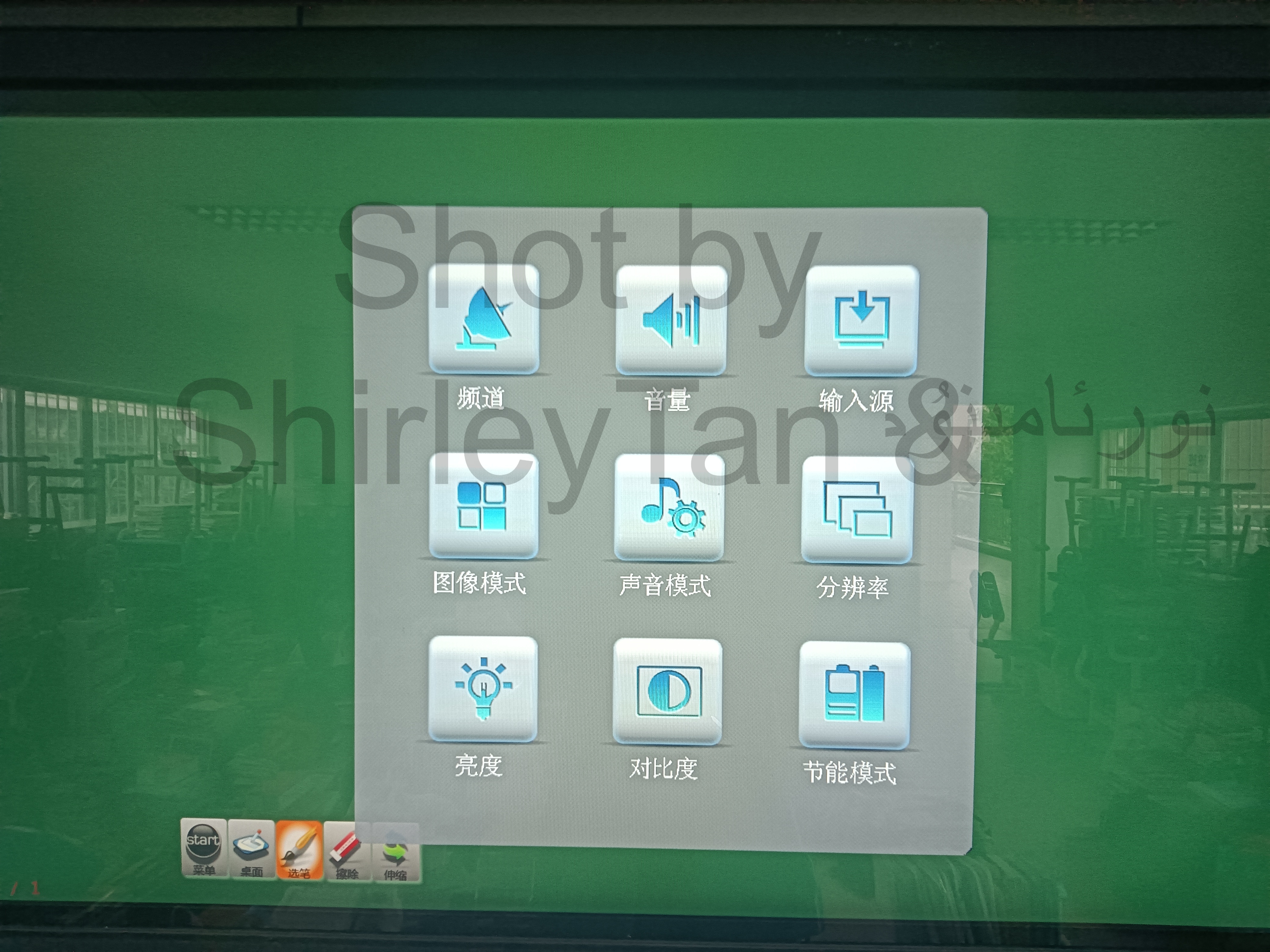
<section><h2>较大的变化<a href="#较大的变化"><span>#</span></a></h2><p>第一款可插拔OPS的希沃机型，初代软中控，可设置定时开关机</p><img src="https://pic2.ziyuan.wang/user/tanxifei/2025/03/BS3_7b0e8610c418b.jpg" /></section>
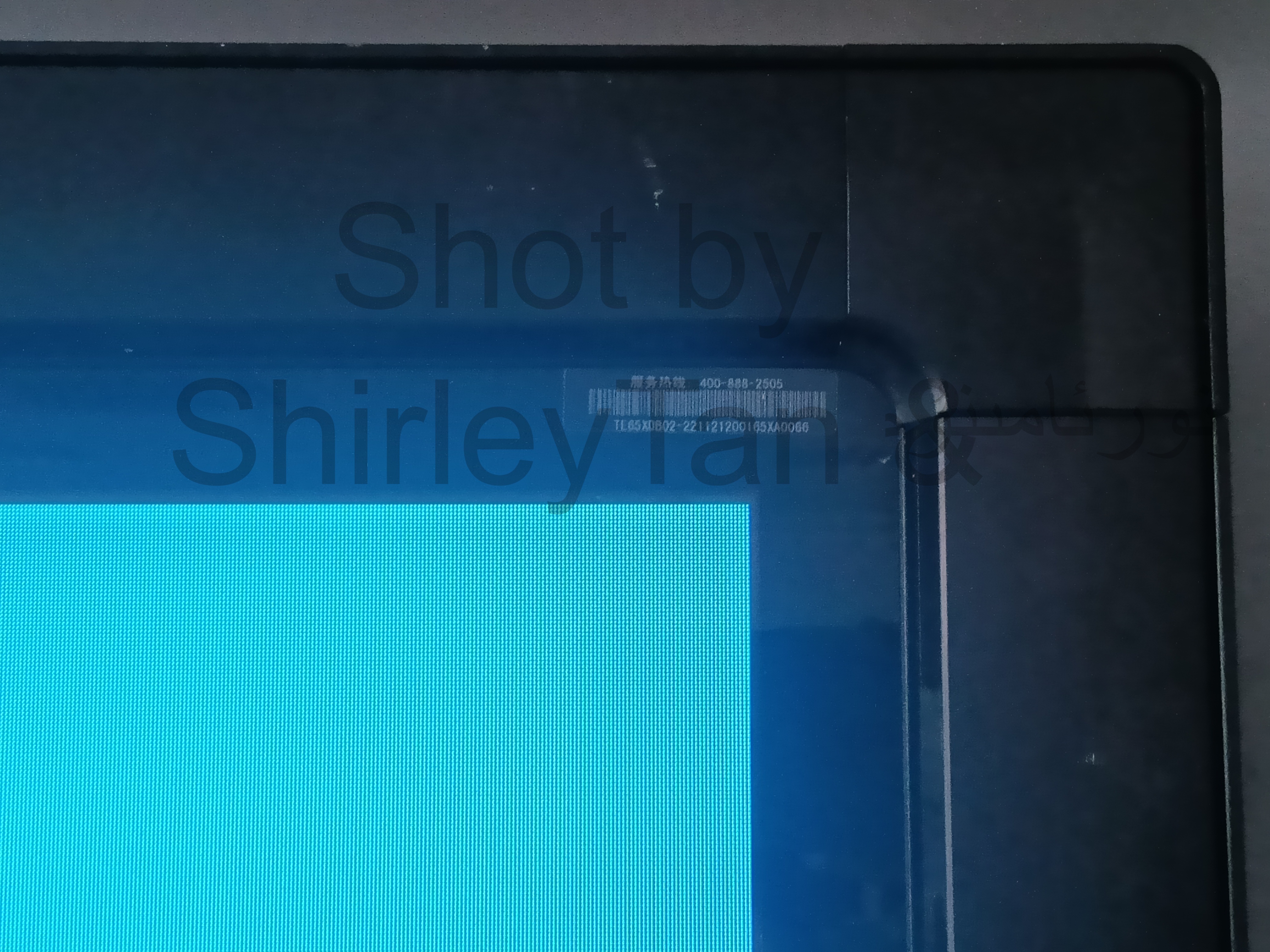
<section><h2>整机外观<a href="#整机外观"><span>#</span></a></h2><p>开机Logo为白底 四周边框较粗</p><p>MCU系统，没有前置USB</p><img src="https://pic2.ziyuan.wang/user/tanxifei/2025/03/BS6_da2f8f1ccc002.jpg" /><blockquote><p>TE65-<strong>D</strong>B02</p></blockquote></section>
<section><h2>前面板搭配<a href="#前面板搭配"><span>#</span></a></h2><section><h3>TExx-DB01:<a href="#texx-db01"><span>#</span></a></h3><p>所有按键位于机身侧边，但此外观的设备全部报废，仅有早期培训资料图</p>

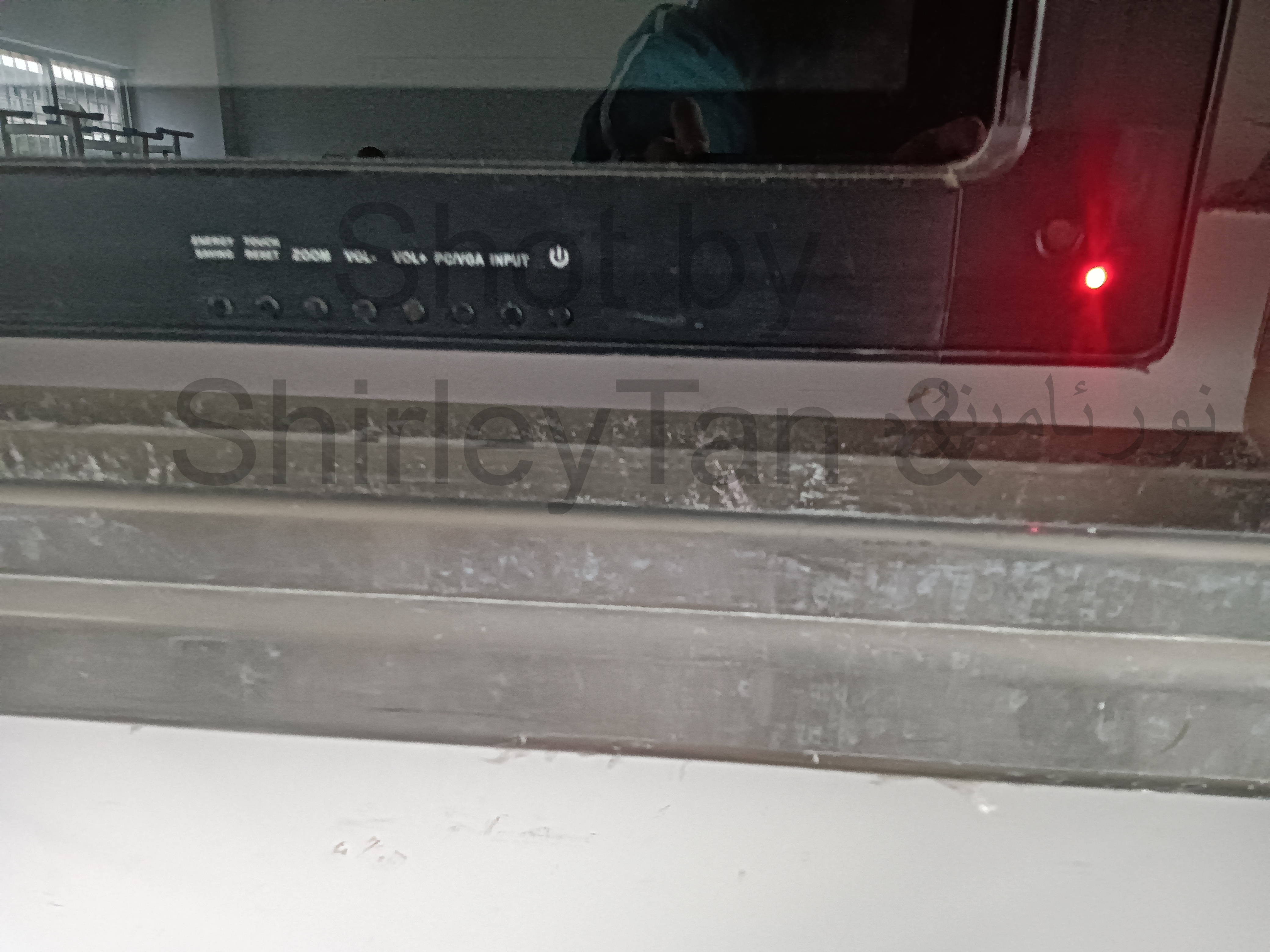
<table><thead><tr><th><div> 正面</div></th><th><img src="/jhpbBseries/DB01-1.jpg" /></th></tr></thead><tbody><tr><td>按键板</td><td><img src="/jhpbBseries/DB01-2.jpg" /></td></tr></tbody></table></section><section><h3>TExx-DB02:<a href="#texx-db02"><span>#</span></a></h3><p>按键：一键节能+触摸重置+快捷调整分辨率+音量+OPS/VGA快速切换+输入源+电源键</p><p>前面板接口：无</p><img src="https://pic2.ziyuan.wang/user/tanxifei/2025/03/BS7_fee35e618818a.jpg" /></section></section>
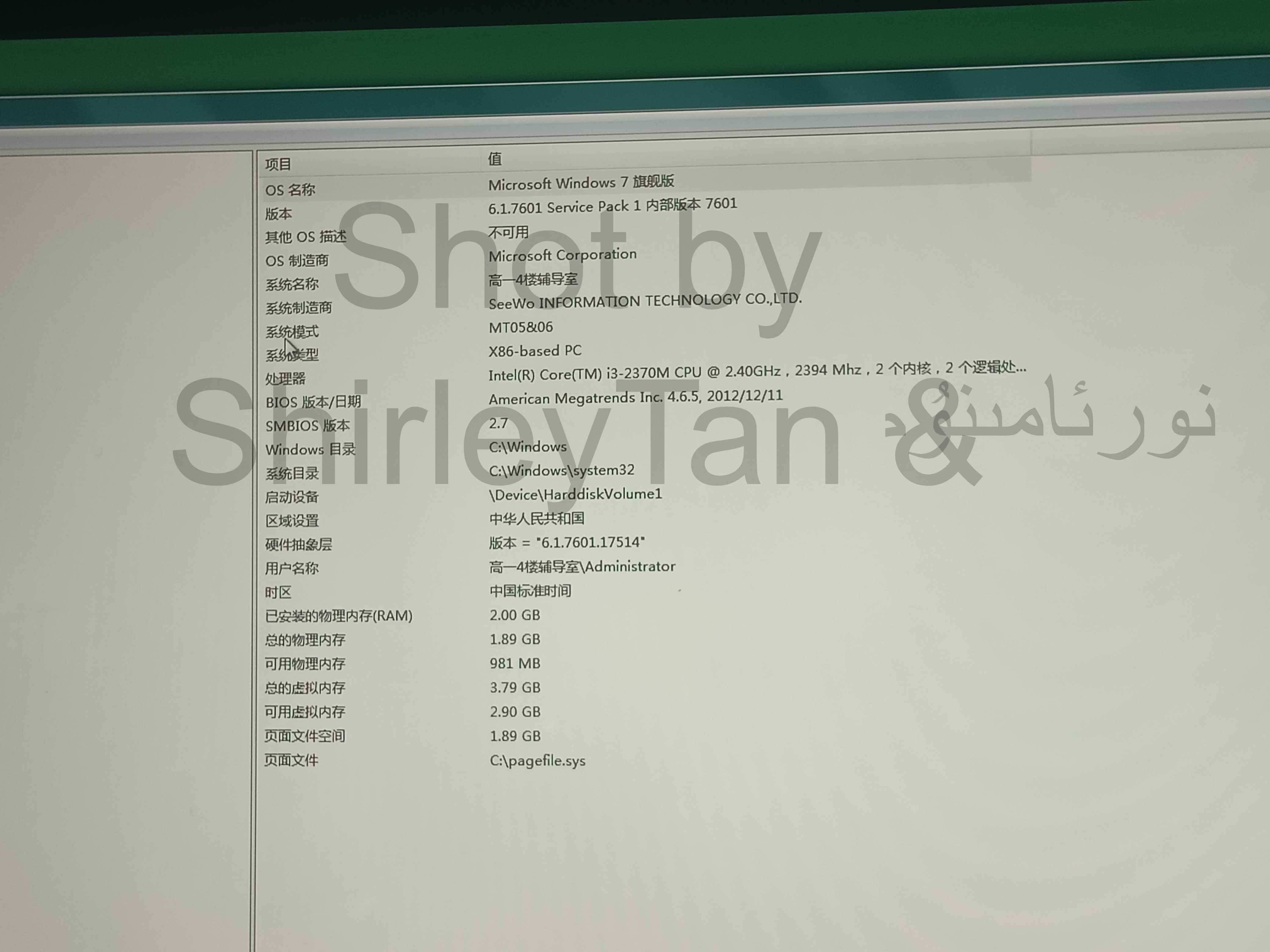
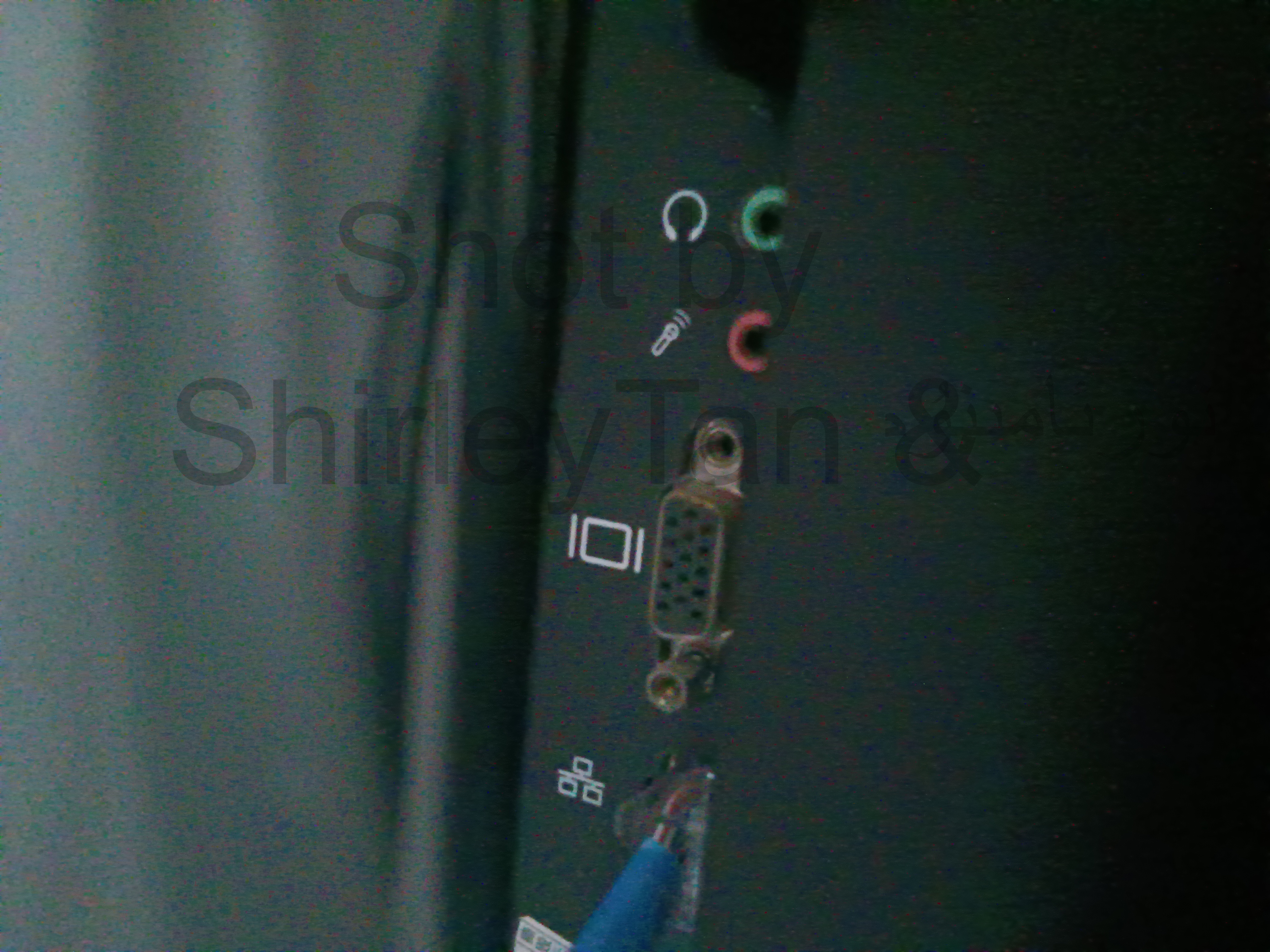
<section><h2>特殊<a href="#特殊"><span>#</span></a></h2><section><h3>杂项<a href="#杂项"><span>#</span></a></h3><p>按键板按键用久了会乱串 DB01/02都一个尿性</p><p>型号贴纸在机身右上角触摸框转角处 为黑色透明贴纸</p><img src="https://pic2.ziyuan.wang/user/tanxifei/2025/03/BS5_013608fdbb21e.jpg" /><blockquote><p>型号贴纸</p></blockquote></section><section><h3>OPS硬件和软件<a href="#ops硬件和软件"><span>#</span></a></h3><section><h4>硬件<a href="#硬件"><span>#</span></a></h4><p>模块一般为MT01、MT06 使用二、三代酷睿移动端处理器</p><img src="https://pic2.ziyuan.wang/user/tanxifei/2025/03/BS4_9bbd571c6cc5a.jpg" /><blockquote><p>系统信息 (SeeWo?)</p></blockquote><p>OPS位于机身左侧</p><img src="https://pic2.ziyuan.wang/user/tanxifei/2025/03/BS8_b0210094da29e.jpg" /></section><section><h4>软件<a href="#软件"><span>#</span></a></h4><p>机器预装的白板软件为EasyMeeting 不支持手背擦除 颜色很绿</p><img src="https://pic2.ziyuan.wang/user/tanxifei/2025/03/BS2_099b809fda199.jpg" /><blockquote><p>EasyMeeting</p></blockquote></section></section></section>
<section><h2>感谢نورئامىنۇم提供的拍摄设备<a href="#感谢نورئامىنۇم提供的拍摄设备"><span>#</span></a></h2></section>]]></content>
    </entry>
</feed>